
MYiPTV4U Live TV Malaysia
What is MYiPTV4U Live TV Malaysia?
MYiPTV4U Live TV Malaysia is a powerful IPTV streaming application designed to provide free, uninterrupted access to a wide selection of live TV channels. Created by ERT GDV, this app is tailored for viewers who want to watch regional content from Malaysia, Indonesia, and Singapore without dealing with paid subscriptions, constant buffering, or disruptive ads.
Its main purpose is to offer a seamless television experience directly from your Android device or PC. Whether you’re a fan of local dramas, news broadcasts, sports, or entertainment shows, MYiPTV4U curates a growing library of live channels that reflect the diverse interests of Southeast Asian viewers. With a simple, lightweight installation, users can instantly stream high-quality content with auto resolution settings based on their internet speed—making it accessible even on slower networks (minimum 1 Mbps recommended).
The app includes essential features like subtitle support, customizable font settings, casting capabilities, and an inbuilt video player that handles multiple file formats. These additions ensure an intuitive viewing experience without the need to download extra media players or codecs.
One of MYiPTV4U’s biggest advantages is its frequent updates, both in terms of performance optimization and content availability. As new channels are added regularly, users can explore fresh entertainment options with each version. The current version 1.1.4 reflects the app’s commitment to stability and user satisfaction, keeping pace with user feedback and regional trends.
What is MYiPTV4U Live TV Malaysia?
Ad-Free Streaming
Enjoy live TV without interruptions—no ads, just seamless entertainment.
Multiple Quality Options
Supports SD, HD, and FHD with auto-resolution based on your internet speed for smooth viewing.
Cast to Smart TVs
Expand your screen by casting content directly to your Smart TV—no extra setup needed.
Buffer-Free Playback
Stream your favorite shows in real-time with zero buffering or freezing.
Smart Subtitle Support
Enable subtitles with customizable font size, color, and style—perfect for accessibility.
Lightweight & Fast
Only 10.1 MB in size with a sleek, user-friendly interface designed for smooth navigation. What’s New in the Latest Version (v1.1.4)?
How to Download and Install MYiPTV4U Live TV Malaysia APK
On Android
To download and install MYiPTV4U Live TV Malaysia APK on your Android device, follow these simple steps:
- Enable “Unknown Sources”: Before downloading any APK file, make sure your phone allows installations from third-party sources. Go to Settings > Security and enable the option for “Install from Unknown Sources.”
- Download the APK: Visit a trusted source like APKPure or the official MYiPTV4U website to download the latest version (v1.1.4) of the APK file. Always ensure you’re downloading from a reliable site to avoid security risks.
- Install the APK: Once the APK file is downloaded, open it from your Downloads folder or Notification bar. Tap on the file to begin the installation process. Follow the on-screen prompts to complete the installation.
- Launch the App: After installation, the MYiPTV4U icon will appear in your app drawer. Tap to open and enjoy seamless streaming of your favorite Southeast Asian TV channels.
5.2 On PC Using GameLoop Emulator
If you prefer to watch MYiPTV4U on a larger screen, you can use the GameLoop Emulator, which allows Android apps to run on your PC. Here’s how to set it up:
- Why Use GameLoop?: GameLoop is a popular emulator for running Android apps on PC. It offers smooth performance, no lag, and a user-friendly interface for streaming mobile apps on your computer screen.
- Installation Steps for GameLoop:
- Visit the GameLoop website and download the installer.
- Run the installer and follow the instructions to set up GameLoop on your PC.
- Visit the GameLoop website and download the installer.
- Downloading and Running MYiPTV4U on PC:
- Open GameLoop and search for MYiPTV4U in the app store.
- Click on Install and wait for the app to download.
- Once installed, launch MYiPTV4U from the GameLoop interface.
- Open GameLoop and search for MYiPTV4U in the app store.
- Benefits of Watching on a Larger Screen: Watching MYiPTV4U on your PC allows you to enjoy a bigger display, better sound quality, and enhanced visual experience, perfect for group viewing or when you prefer a more immersive TV experience. Plus, no battery constraints or interruptions from mobile notifications.
System Requirements for MYiPTV4U Live TV Malaysia
To ensure the smooth functioning of MYiPTV4U Live TV Malaysia on your Android device, it’s important to meet certain system requirements. These requirements are designed to optimize the app’s performance, allowing users to enjoy seamless streaming without interruptions. Minimum Android Version: MYiPTV4U requires at least Android 5.0 (Lollipop) or higher. This ensures that the app can take advantage of the latest Android features and security patches, allowing for smoother functionality and better overall performance. Minimum Storage and RAM: For storage, the app itself is relatively light, requiring only around 10.1 MB of space on your device. However, it’s recommended that you have additional free space for app data, cache, and to avoid any performance slowdowns during use. In terms of RAM, MYiPTV4U works best with a device that has a minimum of 2 GB RAM. Having sufficient RAM ensures that the app runs efficiently without any lag or stuttering, especially when switching between channels or using other features like casting or adjusting settings.
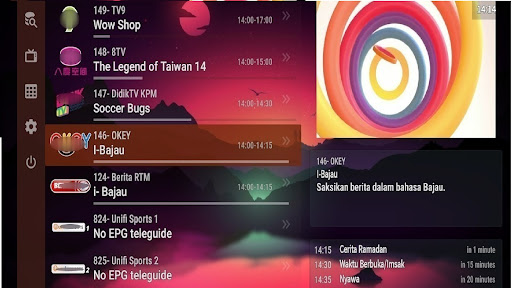
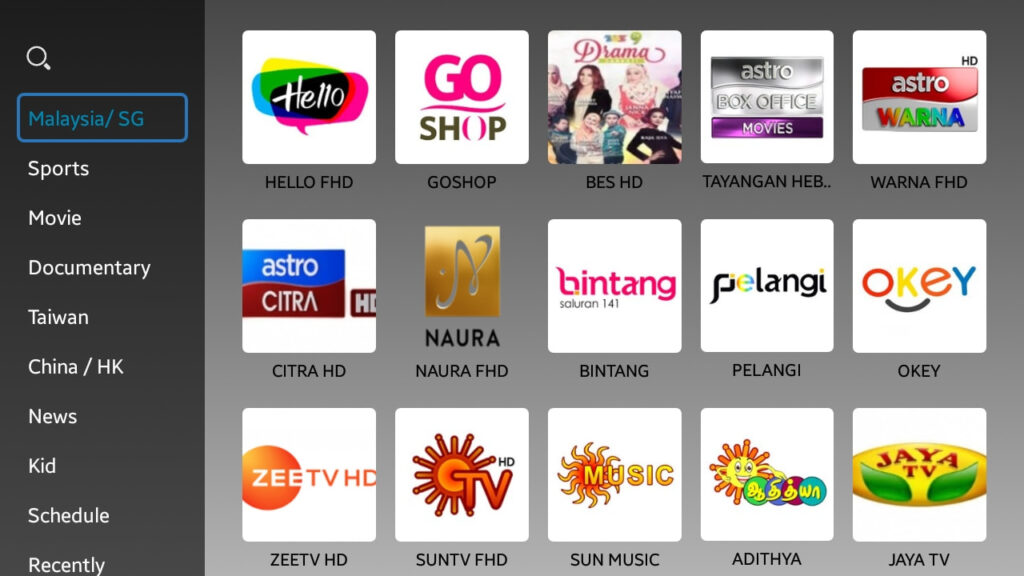
Why MYiPTV4U Stands Out
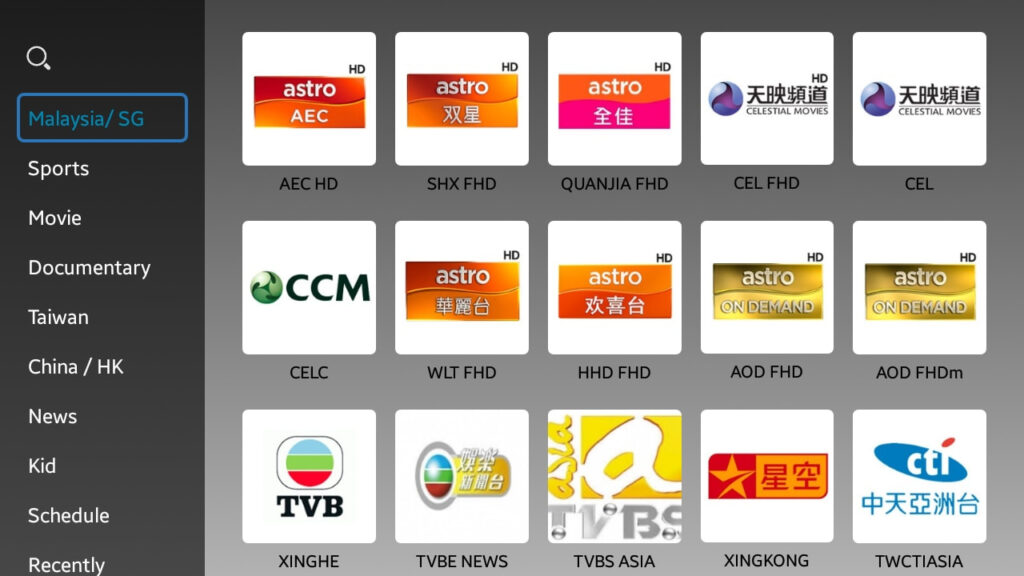
MYiPTV4U vs Other IPTV Apps
When it comes to IPTV apps, MYiPTV4U Live TV Malaysia competes with several popular options in the market. Here’s a comparison of MYiPTV4U with other well-known IPTV apps, followed by its unique advantages and drawbacks.
Comparison Table: MYiPTV4U vs Popular IPTV Apps
Feature | MYiPTV4U | IPTV X | LiveNet TV | RedBox TV |
Free | Yes | Yes | Yes | Yes |
Ad-Free | Yes | No | No | No |
Buffer-Free | Yes | No | No | No |
Resolution Options | SD, HD, FHD | SD, HD | SD, HD, FHD | SD, HD |
Region Coverage | Malaysia, Indonesia, Singapore | Global | Global | Global |
Smart TV Casting | Yes | Yes | Yes | Yes |
Subtitle Support | Yes | Yes | Yes | Yes |
App Size | 10.1 MB | 15 MB | 18 MB | 12 MB |
Pros & Cons of MYiPTV4U
Pros:
- Ad-Free & Buffer-Free: Unlike many IPTV apps, MYiPTV4U offers a smooth, uninterrupted viewing experience without any ads or buffering.
- Multiple Resolutions: It supports SD, HD, and FHD resolution, ensuring users can stream content based on their internet speed.
- Lightweight: At just 10.1 MB, it won’t take up much storage on your device.
- User-Friendly Interface: The app is easy to navigate, offering a seamless experience even for first-time users.
- Region-Specific Channels: Focused on streaming channels from Malaysia, Indonesia, and Singapore, making it ideal for viewers in these regions.
Cons:
- Limited Global Channels: The app mainly focuses on content from Malaysia, Indonesia, and Singapore, so international users may find it lacking in global channel variety.
VPN Requirement for International Users: Non-Malaysian users need a VPN to access the full range of channels.
Is MYiPTV4U Safe and Legal?
When considering any APK file or third-party application, safety and legality are important factors. Here’s a detailed look at the safety and legal aspects of using MYiPTV4U Live TV Malaysia.
APK Safety
MYiPTV4U APK is widely regarded as safe when downloaded from trusted sources. Websites like CNET and APKPure offer the latest version of the app, ensuring it’s free from malware or harmful software. However, it’s always essential to be cautious about where you download APK files. Downloading from unreliable or unknown sources could expose your device to potential security risks, such as viruses or data theft.
To ensure you are downloading a secure version, always use reputable platforms like APKPure or CNET. These platforms verify APKs for safety before making them available for download, reducing the risk of encountering harmful software.
Legal Considerations
When it comes to the legality of MYiPTV4U, it’s important to be aware of the content you are streaming. MYiPTV4U primarily provides access to TV channels from Malaysia, Indonesia, and Singapore. For users within these countries, accessing local content is generally not an issue, as the app serves as a convenient way to watch TV online.
However, international streaming can raise legal concerns depending on the region. Some content might be subject to regional licensing agreements, meaning users outside the designated regions (like Malaysia) may violate terms of service agreements or copyright laws by accessing restricted content.
Using a VPN
To safely and legally access MYiPTV4U outside its intended regions, a VPN is recommended. A VPN helps bypass geographical restrictions by masking your real IP address and routing your traffic through a server in the allowed region, ensuring uninterrupted and legal access to the content.
In conclusion, while MYiPTV4U itself is generally safe when downloaded from trusted sources, users should be mindful of the legal implications and consider using a VPN if required to access content outside their region.

MYiPTV4U is an IPTV (Internet Protocol Television) service that provides access to live TV channels, movies, and on-demand content over the internet, typically through subscription-based plans.
You can subscribe by visiting the official MYiPTV4U website or contacting their authorized resellers. Choose a suitable package, complete the registration, and follow the payment instructions.
MYiPTV4U is compatible with a variety of devices, including Smart TVs, Android TV boxes, smartphones (Android/iOS), PCs, and streaming devices like Firestick.
Legality depends on the content licensing agreements in your region. It’s important to ensure the service complies with local broadcasting laws before subscribing.
Using a VPN (Virtual Private Network) is recommended to enhance privacy, bypass geo-restrictions, and ensure a stable connection—especially if the service is restricted in your country.
A minimum internet speed of 5 Mbps is recommended for standard quality. For HD or 4K content, 10-25 Mbps or higher ensures a smoother streaming experience.
Yes, MYiPTV4U typically includes access to a wide range of live sports channels covering football, basketball, cricket, and other popular sports.
Most providers or resellers of MYiPTV4U offer customer support via email, WhatsApp, Telegram, or live chat, depending on where you subscribed.
Yes, many MYiPTV4U setups include parental control features, allowing users to restrict access to adult or sensitive content.
Once your subscription expires, access to the content will be blocked. You can renew your plan through the same provider or reseller to continue using the service.